"My water pump keeps cycling." Is that the 12-volt pump or the city water inlet? Is the tank full? Did it start after winterizing? A good support tech asks one quick question before answering. A bad one guesses, writes three paragraphs, and gets it wrong.
Your Grover assistant now works like the good tech. When it needs a detail, it asks, and your customer answers with a tap.
Question Cards
When the assistant can't answer well without knowing something, it shows a small card with the question and a few answers to choose from. Your customer taps one and the assistant carries on.
When it needs a few details at once, it asks them together on one card instead of dragging the conversation out one question at a time. And a simple "want me to keep going?" shows up as a tap, not a question buried at the end of a long reply.
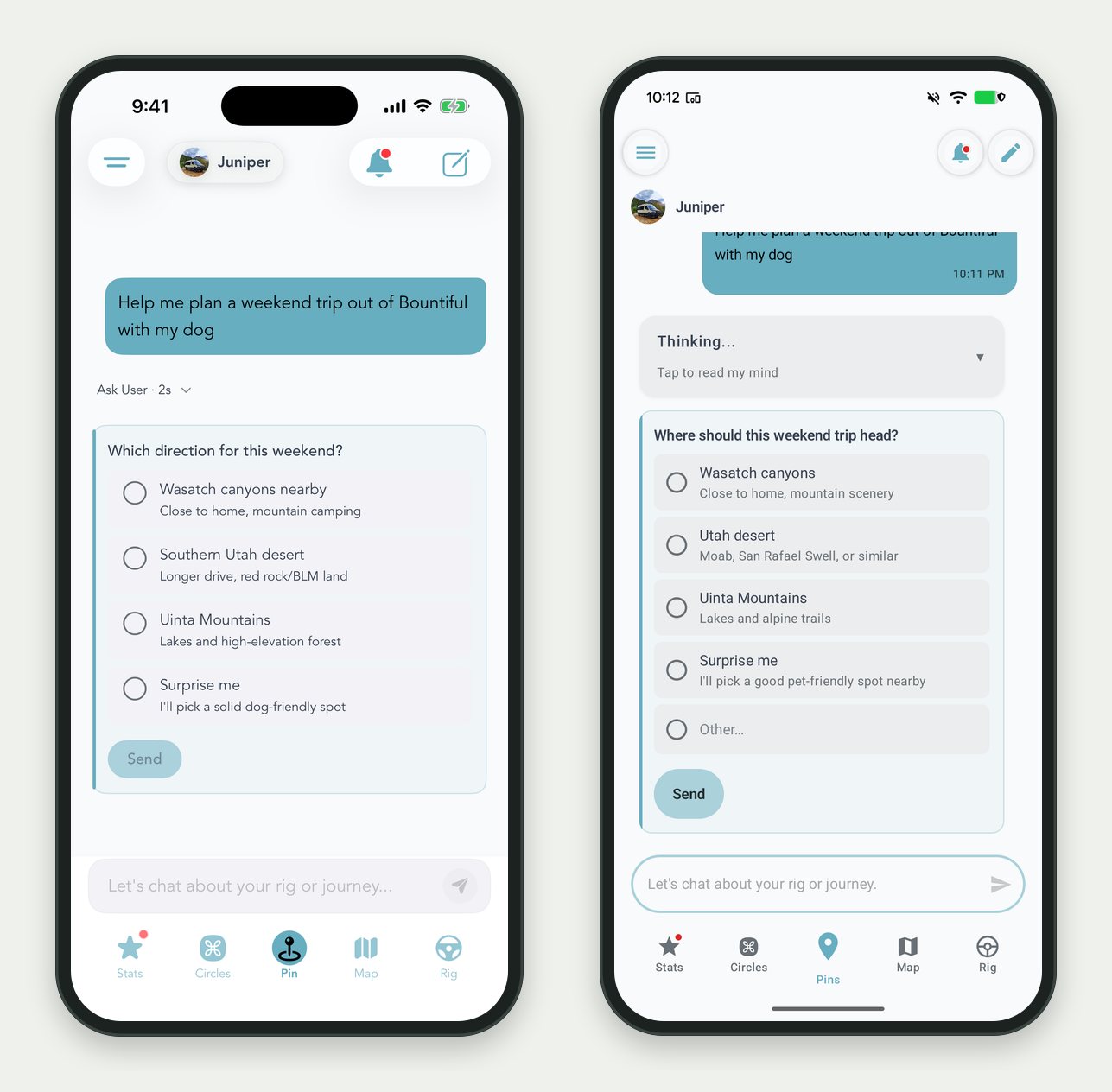
The same question on iPhone and Android. Tap an answer and keep going.
Question cards are on for your assistants already. New assistants get them by default.
It Knows the App, Too
Some of the questions your customers ask your assistant aren't about the rig at all. They're about Grover. Where do I enter my access code? How do I switch to my new van? What's a Home Circle? How do I delete my account?
Your assistant now answers those itself. It checks Grover's own help notes and the live list of brands in the app before it says "I don't know" or sends someone to support. If a customer types your brand's name in a way the assistant doesn't recognize, it looks it up instead of assuming you don't exist.
Access codes stay private. The assistant can tell a customer whether your brand needs a code and where to enter it. It never reveals the code.
Manage FAQs From Claude
FAQs are the short, exact answers you want your assistant to give every time: your warranty window, your service hours, which fridge you install. You can now manage them from Claude with the Grover connector, the same way you already handle targets and events.
Ask Claude to list your FAQs, add one, fix the wording on another, or delete one that's out of date. You can also choose which assistants use each FAQ. Hand one to only your Sprinter assistant, or to all of them. Claude adds or removes a single assistant without touching the rest.
"Add an FAQ to our Overland assistant: our build warranty is two years on workmanship and covers labor at our shop."
Who can do it: account owners create, edit, and delete FAQs. Admins and viewers can list them. The full breakdown is in Who Can Do What in the Grover Portal.
Honest Notes
The assistant still answers from what you give it. A question card helps it pick the right manual. It doesn't invent one. If a customer's rig needs a document you haven't loaded, add it to their Glovebox.
Cards need a current app. Customers on Grover 1.3.7 or newer get tappable cards on iPhone and Android.
Want a Second Set of Eyes on Your Assistant?
Grab a slot and we will walk through your FAQs and a few real customer questions together. Takes a few minutes.
Schedule a Success Call