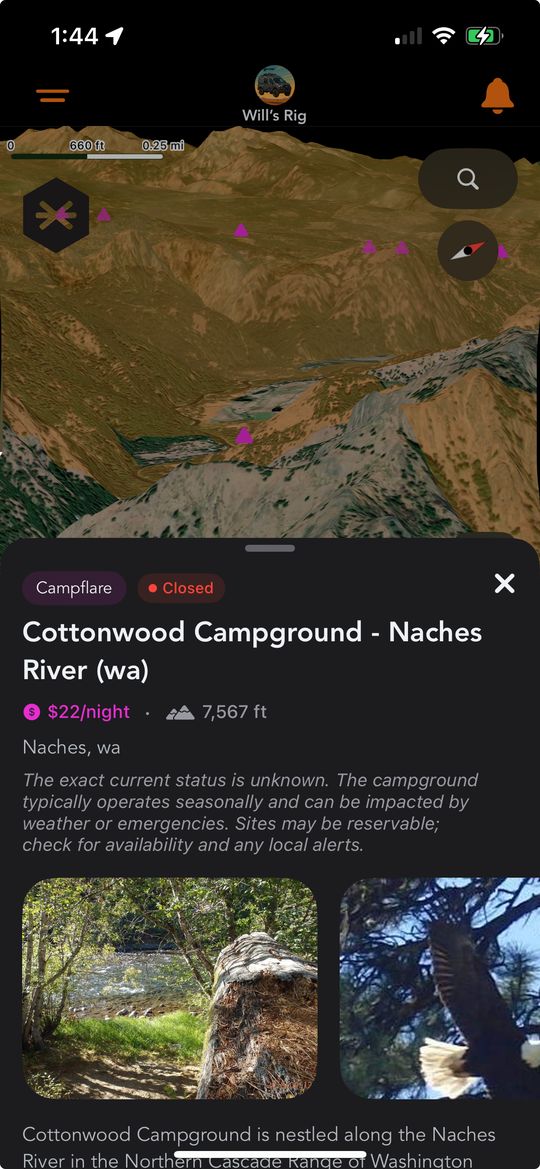
Campflare campgrounds now show up as their own pins on the Grover map, right alongside community spots.
Finding a good place to camp shouldn't take five different apps and a dozen tabs. That's the whole idea behind our new partnership with Campflare, and we couldn't be more excited to bring it to you.
Campflare tracks state and national campgrounds across the country in incredible depth — not just where they are, but what they're really like once you get there. We've brought that entire library onto the Grover map, so more than 10,000 campgrounds now sit right next to your community pins and your LandTrust properties, all in one place.
This is the kind of feature we build Grover for. You already trust the map to show you where your fellow vanlifers have been. Now it can show you thousands of established campgrounds too, each one backed by real details instead of a name and a dot.
"A great campsite shouldn't be a gamble. Our partnership with Campflare means you know what you're rolling into before you ever leave the highway."
A New Layer, Right Where You'd Expect It
Campflare campgrounds live in the Grover filter bar, the same place you already toggle your other map layers. Switch it on and small triangle pins bloom across the map in a distinct pink, easy to pick out from community pins at a glance.
Zoom into a region you're actually planning to visit and the campgrounds around you snap into focus. No more guessing whether a spot on some other map is still open, still public, or even still there.
Over 10,000 campgrounds, one toggle. State parks, national forest campgrounds, and RV parks from coast to coast are now searchable right inside the app you're already using to plan your route.
Like every layer on the Grover map, this one is entirely optional. Turn it on when you're scouting a new stretch of road, turn it off when you just want to see where the community has been. Your map, your call.
Detail Cards Built for the Questions You Actually Ask
Tap a Campflare pin and a full detail card slides up, not a name and a phone number. Right at the top you'll see a status badge telling you whether the campground is open, closed, or seasonal, plus a price range so you know what you're working with before you commit — anywhere from free to a nightly rate. Elevation, city, and state are all right there too, alongside a description you can expand with "Show more" when you want the full picture.
Real photos of the campground sit inside the card, so you're looking at the actual place instead of imagining it from a listing. Below that is an amenities section built as simple tags: WiFi, Water, Showers, Electric, Toilets, Pets OK, Fires OK, Dump Station. One glance tells you whether this is a rustic pull-off or a fully equipped stop.
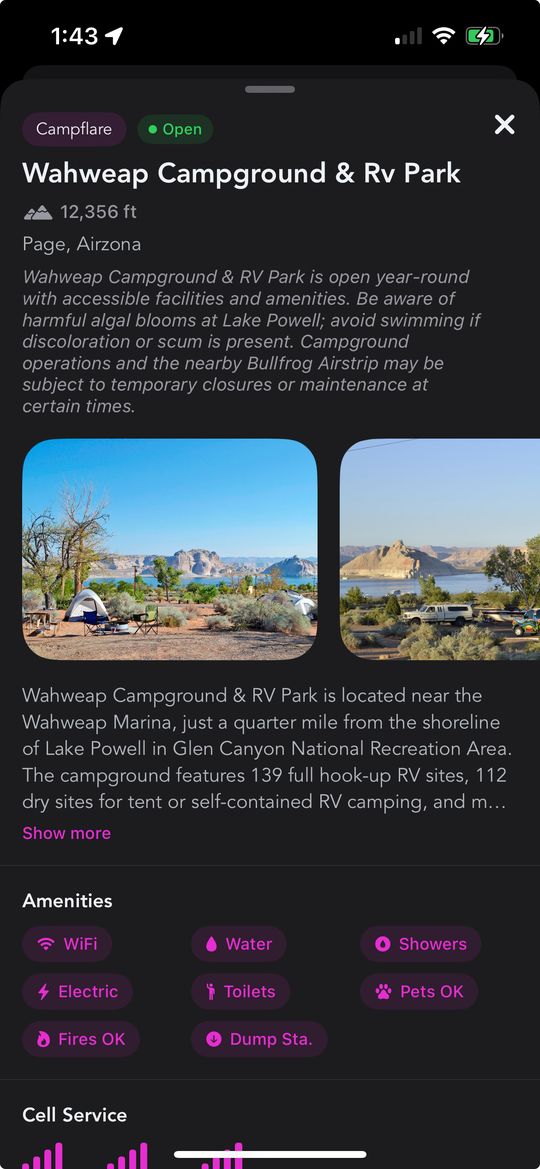
A full Campflare detail card — amenities, photos, and everything you'd want to know before you roll up.
For vanlifers, the details keep going. Each card includes a Cell Service section with signal strength bars for AT&T, Verizon, and T-Mobile, so you can plan around dead zones before you're actually in one. Check-in and check-out times are listed clearly, and if you're rolling in something bigger, you'll find the max rig length and whether the campground is friendly to big rigs and pull-through sites. Every card also names the agency that manages the campground, so you always know who's looking after the land.
It's the kind of depth that used to mean cross-referencing three or four sources before you ever left home. Now it's just a tap away, right where you were already looking at the map. Found a campground worth remembering for a future trip? It's an easy add to your bucket list, so it's waiting for you next time you're in the area. Planning a group trip? Share the find with your Circle before someone else claims the last pull-through site.
Coming Soon: Availability Before You Roll Up
Here's what we're building next, and we can't wait to turn it on. A live availability calendar is on its way for Campflare campgrounds, showing real, day-by-day status for each site — open or reserved — so you can check before you commit to the drive.
To be clear, this isn't live yet. The detail cards you see today are already rich with information, but the availability calendar is still in the pipeline for a future update. When it lands, you'll be able to glance at a calendar and know whether a campground has room for you this weekend or next, all without leaving Grover.
In the meantime, everything else described above is live right now. Open the map, toggle on the Campflare layer, and start exploring. And if you're mid-drive and just want to know what's nearby, ask Grover's chat about your current location and it'll help you find a Campflare campground without you ever pulling over to check a map.
Great trips are built on good information, and this partnership hands you a mountain of it. Whether you're chasing a specific state park or just want a reliable stop for the night, the Campflare layer is ready to help you find it. Pair it with a solid trip plan and you'll spend a lot less time wondering where you'll sleep.
Don't have this yet? Make sure automatic updates are turned on in the App Store or Google Play so Grover updates itself the moment new features ship — no need to check back and update manually.
Ready to Find Your Next Campsite?
Download Grover and turn on the Campflare layer. Over 10,000 campgrounds are waiting for you on the map.