You're airing down at the start of a washboard road and you can't remember where your Falcon shocks are supposed to be set. The settings card went in a drawer two summers ago. The van you bought used never came with one at all.
That's the moment we built this for. Van Compass, the suspension and armor shop behind a lot of the lifted Sprinters, Transits, and ProMasters you see at trailheads, partnered with Grover. Their library is in the app now, and your rig assistant can answer from it directly.
What's In the Van Compass Library
It's a lot more than a parts catalog. Over a hundred installation guides cover their lift kits, struts, shocks, leaf springs, skid plates, rocker guards, tow points, winch mounts, and steps, each one tagged with the platform and model years it fits. Two dozen how-to videos sit beside them, from adjusting your Falcon shocks to changing the oil on a Sprinter V6 with the skid plates still on.
Then there's the stuff that answers the questions people actually ask: the Falcon 3.3 shock settings guide, Van Compass's product selection and fitment guide, their customer support policy and FAQ, and a handful of their own write-ups on things like bump stops and recovery points.
Every one of those is searchable by your assistant the moment you add it.
Put It in Your Glovebox
If your builder already set Van Compass up for your rig, it's sitting in your Glovebox under Rig Knowledge and there's nothing to do. Plenty of builders have. If it isn't there, adding it takes about ten seconds.
Try this: tap Rig in the shortcuts bar, open the Glovebox, and tap the plus in the corner. Search "Van Compass." Results come back grouped by brand. Tap the plus on the guide for your kit and it lands in Personalized Knowledge, ready for your assistant to use.
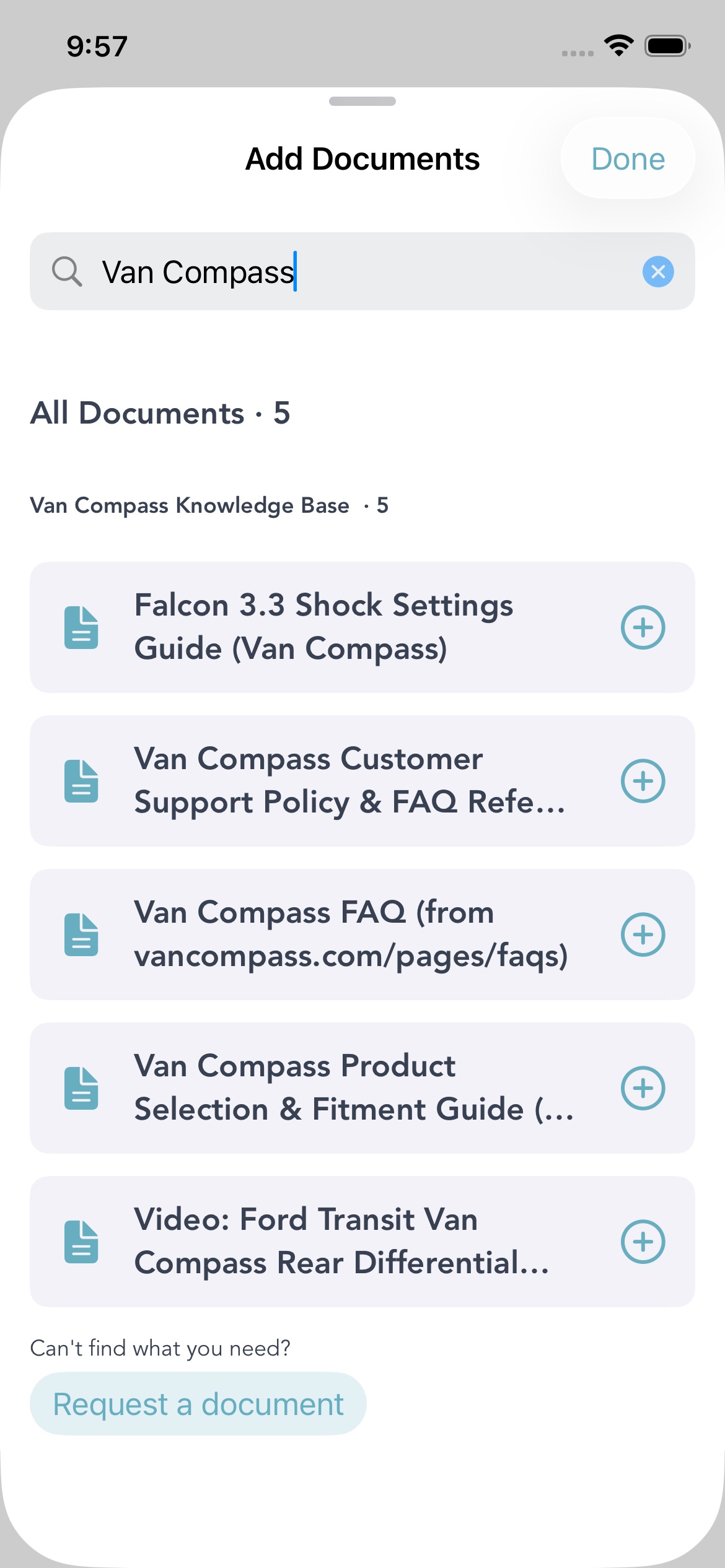
Search "Van Compass" and the library comes back grouped under their name. Tap the plus to add one.
Not sure which kit you have? Add the fitment guide first, then ask your assistant. Tell it your platform and model year, and let it work out the part number from the guide.
Library search is iOS only for now. On Android your assistant still uses Van Compass if your builder added it, and full search is on its way. More on how the Glovebox works in our Glovebox walkthrough.
Why a Partner Beats a Manual
Anything a manufacturer publishes is fair game, and we go get it. That's why the Grover library already carries manuals from MaxxAir, Victron, Espar, EcoFlow, Renogy, Nomadic, and plenty more. If it's a PDF on the internet, your assistant can probably read it.
But the best answers about your rig aren't in a PDF. They're in the heads of the techs who install the parts every week. Which bolt to check after the first hundred miles. Which question every new owner calls about. That knowledge only shows up when a company works with us directly, and it's the difference between a manual and someone who has actually done the job.
Van Compass is doing exactly that with Grover. They won't be the last. Here's how the rest of the library works, and how a brand gets in it.
Running Van Compass Parts?
Open the Glovebox, search Van Compass, and add the guide for your kit. Next time something clunks, ask.